
Complete Guide to Modbus Communication via RS485
Complete Guide to Modbus Communication via RS485
1. About Modbus
Modbus is a universal industrial communication protocol widely used for communication between devices in automation. It was originally developed by Modicon (now Schneider Electric) in 1979 and is an open standard protocol.
In the OSI model, Modbus is typically classified as an application layer protocol. RS485 serves as the physical layer implementation in the OSI model, responsible for electrical and mechanical characteristics, while Modbus usually resides in the application layer, defining the structure, rules, and protocols for data transmission.
The Modbus protocol supports various communication media and networks, including RS232, RS485, and TCP/IP. It is commonly used to establish master-slave communication, where the master sends requests (queries) to the slave, and the slave responds with data.
Protocol Types:
- Modbus RTU: Based on serial communication, typically using RS-232 or RS-485 interfaces.
- Modbus ASCII: Serial communication protocol based on ASCII encoding.
- Modbus TCP: Protocol based on TCP/IP network communication, using Ethernet.
One Master, Multiple Slaves

2. Cross-compiling libmodbus
Since we need to use the libmodbus library and will be running it on an ARM development board, we need to download and cross-compile the library.
2.1 Download libmodbus
I downloaded the latest version 3.1.10.
Extract the archive:
tar -zxvf libmodbus-3.1.10.tar.gz2.2 Configure Compilation Environment
Enter the libmodbus-3.1.10 directory after extraction:
./configure --host=arm-linux-gnueabihf --prefix=/usr/local/arm-libmodbusIf you haven't installed the ARM cross-compilation tools, run:
sudo apt install gcc-arm-linux-gnueabihf2.3 Compile and Install Library
make
sudo make install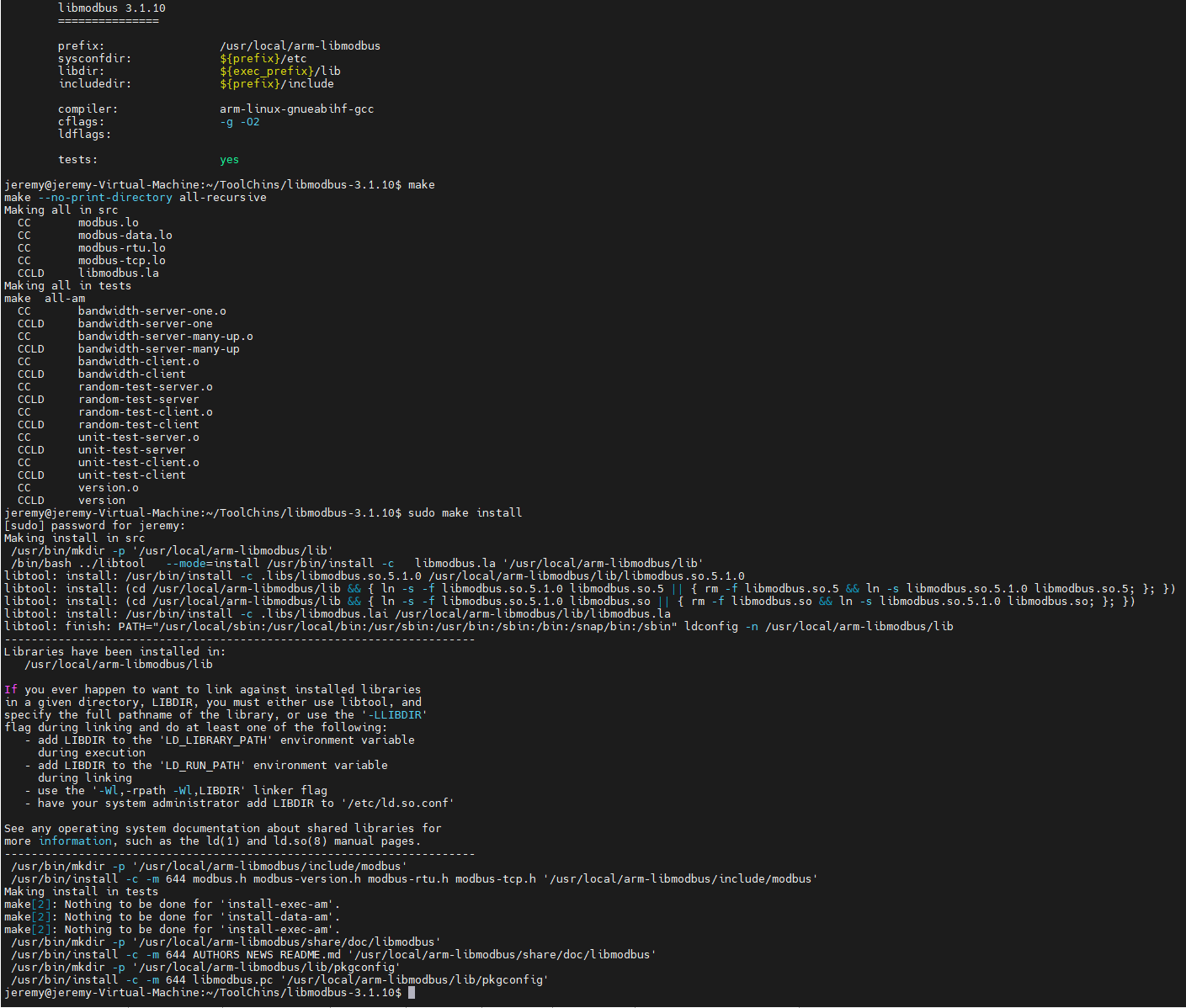
3. Copy Compiled Files to ARM Board
To run programs referencing libmodbus on the board, you need to copy the compiled library and header files to the ARM board.
3.1 Package Library Files
Go to the /usr/local/arm-libmodbus directory and package the files:
cd /usr/local/arm-libmodbus
sudo tar czvf arm-libmodbus.tar.gz lib include
3.2 Install Library
Transfer the archive to the board and extract it:
tar xzvf arm-libmodbus.tar.gzCopy the files:
sudo cp -r lib/* /usr/lib/
sudo cp -r include/* /usr/include/
The library is now installed.
4. C Program Testing Modbus RTU
The Modbus protocol defines the data frame format, including address, function code, data area, and checksum.
If you use RS485 communication directly without Modbus, there is no fixed data format or communication flow, requiring you to handle data frame validation, error detection, and recovery manually.
With the preparation done, let's write a C program to test Modbus RTU using the RS485 interface.
In the code below, I've extracted the baud rate into a header file, but you can also hardcode it or pass it as an external parameter.
4.1 master.c
#include <stdio.h>
#include <modbus.h>
#include <errno.h>
#include "config.h"

int main()
{
    modbus_t *ctx;
    uint16_t tab_reg[32];

    // Create new RTU, set baud rate to 115200
    ctx = modbus_new_rtu("/dev/ttyACM0", BAUD_RATE, 'N', 8, 1);

    // Set Modbus Slave ID to 1
    modbus_set_slave(ctx, 1);

    // Connect to Modbus Slave
    if (modbus_connect(ctx) == -1)
    {
        fprintf(stderr, "Connection failed: %s\n", modbus_strerror(errno));
        modbus_free(ctx);
        return -1;
    }

    // Read 10 registers starting from address 0
    if (modbus_read_registers(ctx, 0, 10, tab_reg) == -1)
    {
        fprintf(stderr, "Read failed: %s\n", modbus_strerror(errno));
        modbus_free(ctx);
        return -1;
    }

    for (int i = 0; i < 10; i++)
    {
        printf("Register %d: %d\n", i, tab_reg[i]);
    }

    // Close connection and free Modbus context
    modbus_close(ctx);
    modbus_free(ctx);
    return 0;
}
4.2 slave.c
#include <stdio.h>
#include <modbus.h>
#include <errno.h>
#include "config.h"

int main()
{
    modbus_t *ctx;
    modbus_mapping_t *mb_mapping;

    // Create new RTU, set baud rate to 115200
    ctx = modbus_new_rtu("/dev/ttyACM0", BAUD_RATE, 'N', 8, 1);

    // Set Modbus Slave ID to 1
    modbus_set_slave(ctx, 1);

    // Connect to Modbus Master (opens the port)
    if (modbus_connect(ctx) == -1)
    {
        fprintf(stderr, "Connection failed: %s\n", modbus_strerror(errno));
        modbus_free(ctx);
        return -1;
    }

    // Allocate Modbus mapping (100 holding registers)
    mb_mapping = modbus_mapping_new(0, 0, 100, 0);
    if (mb_mapping == NULL)
    {
        fprintf(stderr, "Mapping failed: %s\n", modbus_strerror(errno));
        modbus_free(ctx);
        return -1;
    }

    while (1)
    {
        uint8_t query[MODBUS_RTU_MAX_ADU_LENGTH];
        // Receive query from Modbus Master
        int rc = modbus_receive(ctx, query);

        if (rc > 0)
        {
            // Reply to query
            modbus_reply(ctx, query, rc, mb_mapping);
        }
        else if (rc == -1)
        {
            fprintf(stderr, "Receive failed: %s\n", modbus_strerror(errno));
            break;
        }
    }

    // Free Modbus mapping and context
    modbus_mapping_free(mb_mapping);
    modbus_close(ctx);
    modbus_free(ctx);
    return 0;
}
4.3 config.h
Configuration header file. Note the header guards.
#ifndef CONFIG_H
#define CONFIG_H

#define BAUD_RATE 115200

#endif // CONFIG_H
4.4 Makefile
A simple Makefile to facilitate compilation.
CC = arm-linux-gnueabihf-gcc
CFLAGS = -Wall -I/usr/local/arm-libmodbus/include/modbus
LDFLAGS = -L/usr/local/arm-libmodbus/lib -lmodbus

all: master slave

master: master.o
	$(CC) -o master master.o $(LDFLAGS)

slave: slave.o
	$(CC) -o slave slave.o $(LDFLAGS)

master.o: master.c config.h
	$(CC) $(CFLAGS) -c master.c -o master.o

slave.o: slave.c config.h
	$(CC) $(CFLAGS) -c slave.c -o slave.o

clean:
	rm -f master slave *.o
4.5 Execution Results
Use chmod +x [file] to grant execution permissions. If successful, you should see output indicating successful Modbus communication over RS485.
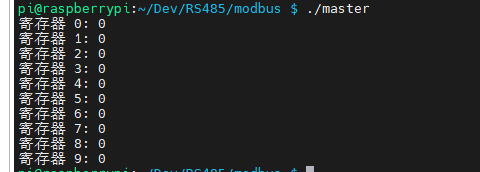
If you just needed a simple communication test, this concludes the guide.
Related Articles:
RS-485 Serial Communication: Simple Guide and Code Examples
END